
Credits (Add-ons)
Credits are the internal payment units used to submit Sales Tax returns, VAT returns, or EPR reports through the platform. Every return filed consumes one credit.
- Auto-submit Credits
Navigate to the Plan & Billing page within your Lappa account to purchase Auto-submit Credits.
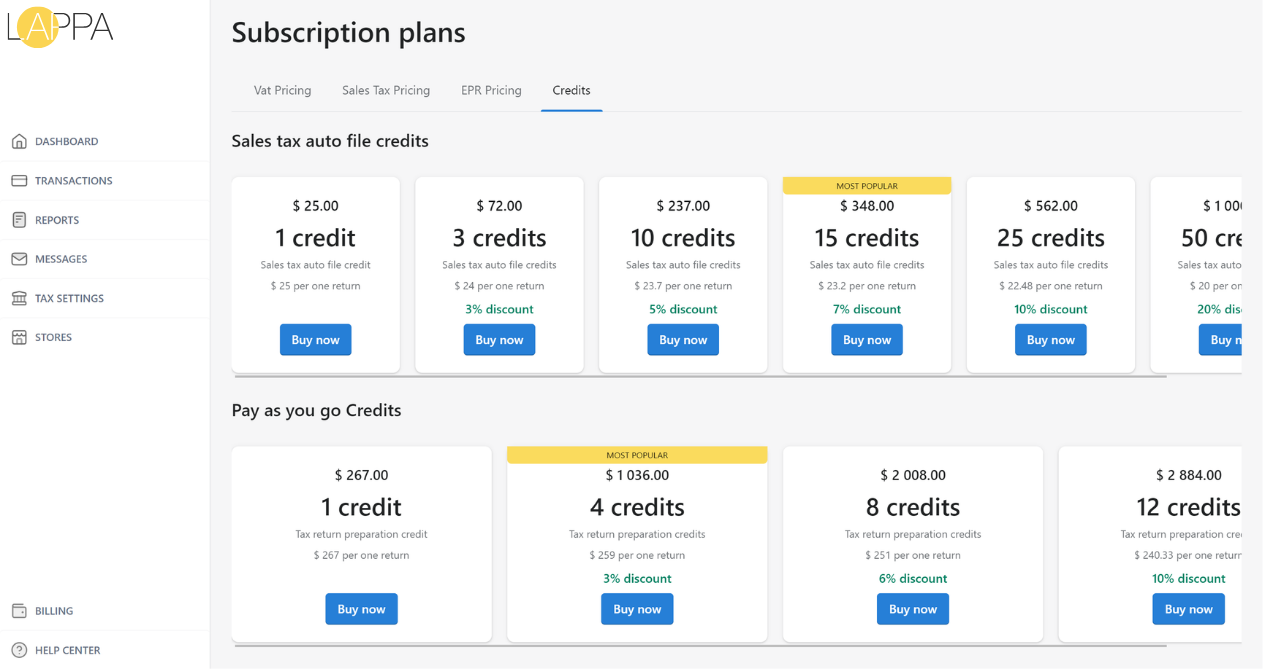
- In the Add-ons section, select Add credits to browse the available credit bundles.
- Once you click Select on your preferred package, you’ll be taken to a confirmation page to review and complete the purchase.
- Your current credit balance is displayed in the Usage and Plan section of your account.
- Pay as you go Credits
This credit option lets you purchase credits to have your tax returns filed manually by the Lappa tax team, without committing to a monthly or annual subscription. This is the recommended choice if you require hands-on assistance with tax preparation.
- EPR credits
EPR reporting plans come with 1 auto-submit credit included, which covers a single EPR return per year. If you need to file EPR reports more than once annually, additional EPR credits can be purchased separately. Credit packs are available for submitting EPR reports to a designated eco-organisation, with pricing determined by the volume of credits and the specific EPR registration type.
Good to know
- Add-ons are flexible and do not have an expiry date — they remain available until fully used at your own pace.
- Purchases of add-ons are non-refundable. Be sure to buy only the quantity you need to avoid unused credits.
- When credits are bundled within your subscription plan, they are issued on your membership renewal date. For yearly plans with 4 credits annually, this may occur once every 3 months. Your renewal date can be found in the Usage and Plan section.
- Membership credits remain active for as long as your subscription is current; however, rollover is subject to a maximum carry-over period of 36 months.